This is Part 4 of a four-part series on self-publishing from the point of having a polished, edited manuscript that’s ready to go.
I went over hiring a book formatter, getting a book cover, getting an ISBN, a barcode, and an LCCN. You can check out the first three article links at the end of this post.
Now it’s on to the steps to upload your book for publishing and distribution.
At this point, you should have your print and digital-ready files in hand.
Okay, let me backtrack just a bit.
PRICING YOU BOOK
When you register for the ISBN and the LCCN, you’ll be asked the price of your book, so figure that out beforehand if you can. If you can’t figure it out, you’ll definitely need to figure out what you’ll be charging at this point.
First, know that different retailers may have different pricing rules. Check the retailers you’ll be focusing on.
If you want an ebook and you’re going with Amazon, you’ll need to price your book between $2.99 and $9.99 to get a 70% royalty rate. For a full list of Amazon’s list price requirements, click the link.
The pricing works slightly differently if you’re publishing a paperback or hardcover. Amazon or any other retailer or distributor will need to factor in the cost of printing.
Keep in mind that printing a children’s picture book or chapter book will cost more than printing a non-picture book. This means your royalty per sale will be lower because the printing costs will higher.
You can check out KDP Amazon printing costs with the link.
To give you an idea, my book, How to Write a Children’s Fiction Book, is over 200 pages, and there are no colored pictures. I went with $9.99 for the paperback and $6.99 for the ebook. I’ve since increased the paperback to $14.95.
I also sell the ebook directly from my website using PayPal. You can check out how that works HERE.
Now you’re up to speed and ready for uploading.
WHICH DISTRIBUTION SERVICE WILL IT BE?
First thing to decide is which service you’ll use to publish and distribute your book.
IngramSpark has the best distribution network, but you have to apply their wholesale discount, which starts at 40 percent. And there is an almost 2% distribution fee on top of that. And if you want wholesalers and bookstores to consider your book, having a 55% discount is warranted. Keep in mind that printing fees will also be deducted.
So, what can this mean for the author?
Below is an example of my IngramSpark net compensation on 4 paperbacks with a 55% discount. The wholesale price from a 14.95 list price is $6.73. Then the printing costs and global distribution fees are deducted. It comes to $1.85 per book:

On some IngramSpark ebook sales, I make around $0.50 per sale.
I used IngramSpark for my nonfiction book, “How to Write a Children’s Fiction Book,” because I wanted to distribute to as many outlets as possible. IngramSpark has one of the largest distribution networks.
With Amazon’s KDP Expanded Distribution, your paperback is added to a catalog used by retailers (including Barnes & Noble, Book Depository, online retailers, and libraries). The print book royalty is 40% with this option, minus printing fees.
If you choose not to use KDP’s Expanded Distribution, the print book royalty is 60 percent, but the book is only sold through Amazon’s own network.
I published my four picture books and a chapter book on Amazon KDP and chose Expanded Distribution. Three of the picture books and the chapter book were with a traditional publisher. Since the publisher wasn’t marketing the books, I got my rights back, revised the books, and republished.
TIP: If you have an existing version of your book that you no longer want active, take it down before uploading the new version.
Using an aggregator for distribution or expanded distribution allows your book to be listed in places like Barnes & Noble, Walmart, Target, schools, libraries, and thousands of other venues.
Other aggregators include Smashwords, Draft2Digital, Ebookit, PublishDrive, and StreetLib.
FYI: An aggregator is a service that publishes and distributes your book to multiple venues.
Two Reasons IngramSpark May Be Necessary:
1. Amazon only publishes hardcover books with a minimum of 75 pages. If you write picture books or chapter books under 75 pages and want a hardcover, you’ll have to go with IngramSpark.
2. If you want a flap jacket or a duplex cover, Amazon does not provide these options.
CREATE AN ACCOUNT
Go to the retailer and/or aggregator you’ve decided to publish with.
Note here: Amazon and IngramSpark are both currently free to upload an ebook, print book, or combo. Other services may not be.
You can simply publish an ebook, but since there is NO additional fee to publish a POD print book, it’s worth offering both formats.
What to do
With either service, you’ll be asked to provide your name, email address, and password to create an account.
They’ll send a verification email for you to click on to activate your account.
Next, you’ll need to accept their terms of agreement and enter your personal or business information. Then, you’ll need to accept more agreements.
After this, you’ll be brought to a page to fill out your book’s information, which will include the following:
- Title
- Subtitle
- Description
- Keywords and Categories
Think carefully about the description, keywords, and categories. These marketing tools are critical for self-publishers. Search algorithms use this information to connect interested readers with your book. It’s what helps readers find your book. This is not a step to rush through.
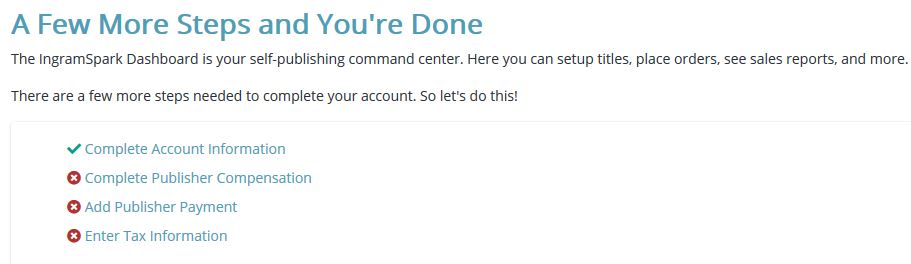
You’ll also need to provide your banking information to receive book sales payments. They also want a credit card on file to pay for author copies of your book/s and for any other services you purchase from them.
NOW ONTO UPLOADING THE BOOK
Follow Instructions Carefully
Follow the service’s instructions, and if you still need help, they have a community that should be able to answer your question. IngramSpark also has a number of articles on self-publishing. Or, you can do an online search. From experience, IngramSpark’s customer service is lacking, and the platform is a little more the problematic than KDP.
PRICING
Check out current, similar books on Amazon to decide on a price, and be sure to factor in the discount and printing costs. Ingram’s pricing page will show you if your retail price is too low and will put you in the negative.
MARKETS
KDP Expanded Distribution primarily targets US/UK distributors, bookstores, and libraries.
With IngramSpark, you’ll also be able to include other markets, such as the United Kingdom, European Union, Canada, Australia, and Global Connect.
I chose them all.
You can check out what your royalty will be for different prices at:
https://myaccount.ingramspark.com/Portal/Tools/PubCompCalculator
DISCOUNTING YOUR BOOK
Publishing on IngramSpark: When you fill in your pricing, you’ll be asked about the Wholesale Discount for bookstores and other retailers of print books.
You can read more about discounting your books at:
https://www.ingramspark.com/blog/why-should-i-discount-my-book
I chose a 55% discount. While you’ll receive a much lower royalty on your sales to wholesalers, at least you’ll have the opportunity to sell more. The lowest discount is 40 percent.
UPDATE: Be careful with discount you choose. With all the fees associated with selling through IngramSpark, depending on the purchaser, I can make less than a dollar per book.
At the time of writing this article, Amazon doesn’t provide discounts for libraries or wholesalers.
RETURNS
With IngramSpark, you have the option to allow Returns. But, if you intend to sell to book stores and other retailers who buy in bulk, know that most will not purchase your book, even at a discount, if they can’t return it.
The catch with Ingram’s returns is that if a book is returned, you will be charged for the wholesale price of that book. So, if you allow returns, save the money from discounted purchases for a while to ensure you have enough funds to reimburse any returns.
If you do allow returns, be sure to choose “Returns – Destroy.” With this option, you’ll only pay for the wholesale purchase amount, not shipping and handling fees.
I’m pretty sure there is a six-month time limit on returns from discounted sales.
With Amazon, you don’t have an option. They automatically allow returns on print books, but they don’t deduct the sale of the book from you if it’s returned. Instead, they restock the book. However, if that book is sold again, you will not receive payment for it.
Book Returns can be tricky. You can read more about this item below:
Self-Publishing and Book Returns

Making Your Book Returnable

Returns 101: What Authors Need to Know
DISTRIBUTION
At this point, you’ll take your digital and/or print-ready files and upload them.
You’ll be asked to upload the manuscript and the cover separately. This is where a ‘good’ formatter/designer is essential. The files need to meet the requirements of whichever publishing service you’re using.
IngramSpark notes that the files “must strictly adhere to specific formatting, resolution, and page count standards.”
There are elements such manuscript and interior formatting (the file format, bleed and resolution for illustrations, color model). There are also cover requirements, fonts and text embedding, safety margin…
This is why it’s essential to use a formatter/designer service that knows what they’re doing.
Once you upload your files (book) and it’s approved, the distributor (IngramSpark) or retailer/aggregator (Amazon) will make it available for sale. This can take up to 72 hours.
That’s it!
Hope this eases the process of self-publishing your books.
You can check out the other articles in the series here:
Self-Publishing a Book (1) – Formatting
Self-Publishing a Book (1A) – More on Formatting and Searchability
Self-Publishing a Book (2) – The ISBN, the Barcode, and the LCCN
Self-Publishing a Book (3) – The End of the Formatting Process
Working with so many clients, many need help figuring out how to self-publish. Doing it themselves seemed overwhelming. Or, they got taken to the 'self-publishing cleaners.' So I started Writers on the Move Self-Publishing Service. See how it can help you.

1 thought on “Self-Publishing a Book – Steps to Upload Your Book for Publishing”